# Restaurant POS Software in the UK: How Modern EPOS Systems Help Restaurants Grow in 2026
Running a restaurant in the UK involves much more than taking payments.
Restaurant owners and managers need to handle orders, tables, menus, kitchen operations, inventory, staff, payments, customer information, and daily reporting—all while delivering a fast experience to customers.
This is why **restaurant POS software in the UK** has become an important part of modern restaurant operations.
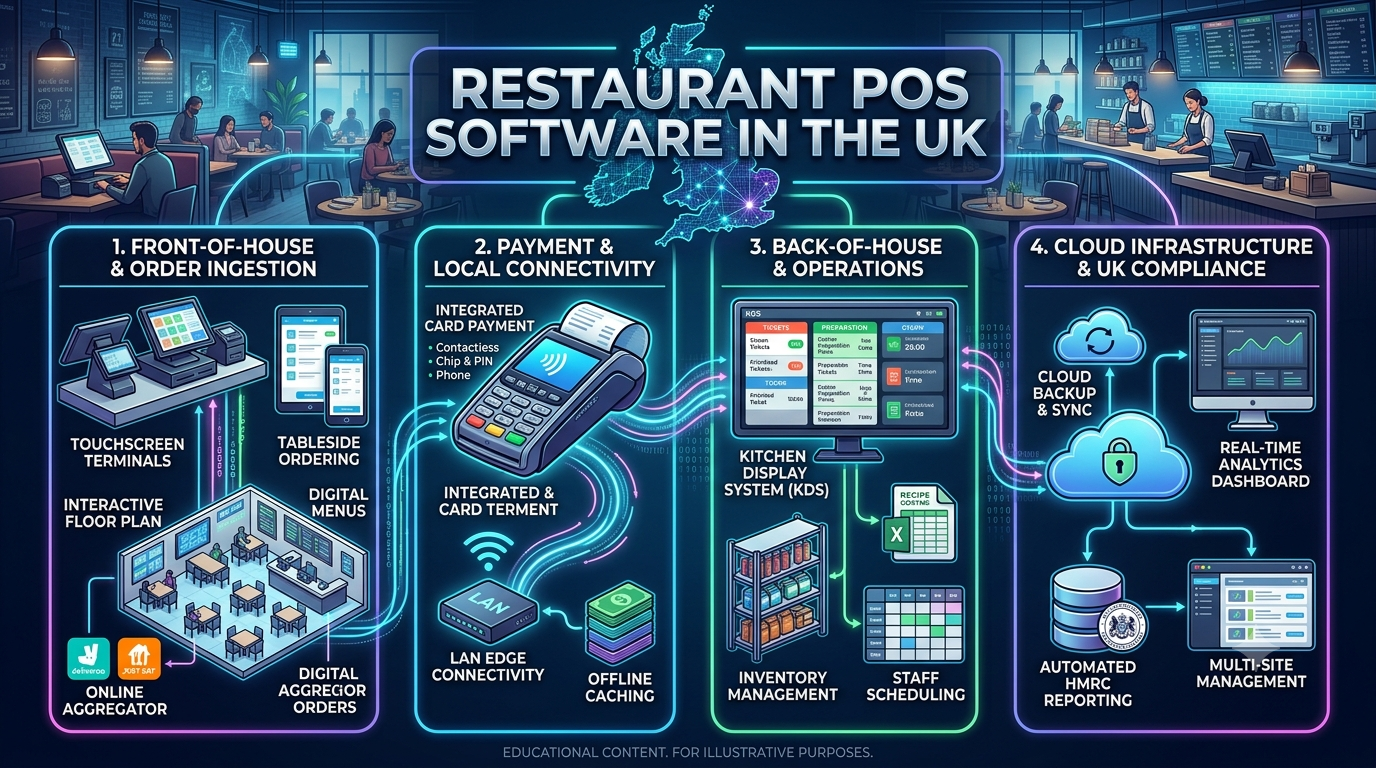
A modern POS or EPOS system can connect front-of-house, kitchen, management, payments, and reporting in one platform.
For independent restaurants, cafés, pubs, takeaways, hotels, QSRs, and growing restaurant groups, the right **EPOS solution UK** can help simplify everyday operations and provide better visibility into the business.
## What Is Restaurant POS Software?
Restaurant POS software is a digital system used to manage restaurant transactions and operational processes.
A modern restaurant POS system can bring together:
* Order management
* Billing
* Table management
* Menu management
* Kitchen orders
* Inventory
* Staff management
* Customer information
* Payments
* Discounts
* Reports
* Multi-location management
Instead of using separate systems for different activities, restaurants can use an integrated platform to manage key operations from one place.
## Why Restaurants Need Modern EPOS Software
Traditional tills can process transactions, but today’s restaurants need more than a cash register.
A restaurant may receive orders through:
* Dining tables
* Counter service
* Takeaway
* Phone
* Online ordering
* Delivery platforms
* QR codes
Managing all these channels manually can create unnecessary work.
A modern **restaurant EPOS system** can help bring orders and operational information into a more organized workflow.
For example:
**Customer Order → POS → Kitchen → Payment → Inventory → Reporting**
This creates a connected flow of information across the restaurant.
# Key Features of Restaurant POS Software
## 1. Fast Restaurant Billing
Speed is critical during busy service periods.
A POS system should allow staff to quickly:
* Add items
* Modify orders
* Apply discounts
* Split bills
* Process payments
* Print or send receipts
A faster billing workflow can help reduce queues and improve the customer experience.
## 2. Table Management
For dine-in restaurants, table management is an important part of POS functionality.
Staff can use the system to monitor:
* Available tables
* Occupied tables
* Orders by table
* Table status
* Bill status
A visual table layout can make it easier for front-of-house teams to understand the current restaurant situation.
## 3. Kitchen Order Management
Once an order is taken, the kitchen needs accurate information.
A restaurant POS can send orders directly to kitchen printers or a Kitchen Display System (KDS), depending on the setup.
This can reduce:
* Misheard orders
* Manual ticket writing
* Duplicate entries
* Communication delays
For busy restaurants, connecting POS and kitchen operations can make service more organized.
## 4. Menu Management
Restaurant menus change frequently.
Restaurants may need to update:
* Prices
* Ingredients
* Meal combinations
* Add-ons
* Sizes
* Availability
* Special offers
A centralized menu-management system can make these changes easier to maintain across different ordering channels.
## 5. Inventory Management
Inventory directly affects restaurant profitability.
A POS system can connect sales activity with stock information.
For example:
**Item Sold → Inventory Updated → Stock Level Changed**
Restaurants can monitor products and ingredients that are moving quickly and identify items that may require replenishment.
## 6. Multi-Location Management
Restaurant groups may operate several branches.
Managing each location separately can make reporting and administration difficult.
A centralized POS platform can help businesses manage:
* Menus
* Pricing
* Sales reports
* Locations
* Staff
* Inventory
* Performance
from a common management environment.
This can be particularly useful for growing restaurant chains.
# Cloud-Based POS Software for UK Restaurants
Cloud technology has changed how restaurant businesses manage their POS systems.
A cloud-based POS can allow authorized users to access business information through connected devices and centralized systems.
Potential benefits include:
* Centralized data
* Remote management
* Easier updates
* Multi-location visibility
* Centralized reporting
* Integration with other cloud services
For example, a restaurant owner may want to review sales performance without being physically present at the restaurant.
A cloud-connected system can make this type of management more practical.
## Does Restaurant POS Need Internet?
This depends on the specific POS architecture.
Restaurants should ask whether the system supports offline operation for important functions.
This is particularly important because restaurants cannot always depend on uninterrupted internet connectivity.
A good restaurant technology strategy should consider:
* Offline billing
* Local data handling
* Payment continuity
* Automatic synchronization
* Network recovery
The exact offline capabilities depend on the POS provider and payment setup.
# QR Ordering and Contactless Restaurant Technology
QR ordering has become another option for modern restaurants.
Customers can scan a QR code and access a digital menu or ordering interface.
A connected restaurant POS can potentially receive these orders directly.
The workflow can look like:
**QR Code → Digital Menu → Customer Order → POS → Kitchen → Payment**
This can reduce manual order entry and provide another ordering channel.
QR ordering can be especially useful for:
* Restaurants
* Cafés
* Hotels
* Food courts
* Casual dining
* Bars
# Online Ordering and POS Integration
Restaurants increasingly operate across both physical and digital channels.
An integrated POS can connect restaurant operations with online ordering systems.
This can help businesses manage:
* Online orders
* Takeaway orders
* Delivery orders
* In-store orders
from a more centralized workflow.
Without integration, restaurant staff may need to manually enter online orders into the POS.
This creates additional work and can increase the possibility of errors.
# Restaurant Payment Integration
Payment processing is one of the most important components of a POS system.
Modern restaurant POS platforms may support different payment methods depending on the provider and payment integration.
These can include:
* Card payments
* Contactless payments
* Mobile wallets
* Cash
* Integrated payment terminals
A connected payment workflow can reduce manual entry and help make transaction processing more efficient.
Restaurants should also evaluate payment security, reporting, reconciliation, and compatibility when selecting a POS solution.
# Restaurant POS Reports and Analytics
A POS system generates valuable operational data every day.
Restaurant owners can use reporting to understand:
* Daily sales
* Weekly sales
* Popular menu items
* Slow-moving products
* Peak sales periods
* Discounts
* Payment methods
* Location performance
For example, a restaurant may discover that a particular menu item performs significantly better during evening service.
This information can help management make more informed decisions about menus, promotions, staffing, and inventory.
# Staff Management
Restaurant operations depend heavily on staff.
A POS system can help businesses manage aspects of:
* Staff accounts
* Roles
* Permissions
* Shift information
* Order activity
* Cashier activity
Different employees can be assigned different levels of access.
For example, a server may need access to order entry while a manager may require access to reports, discounts, refunds, and administrative settings.
# Customer Loyalty and CRM
Modern restaurant POS software can also support customer relationships.
Businesses can potentially collect permitted customer information and use it to support:
* Loyalty programs
* Rewards
* Customer offers
* Purchase history
* Marketing campaigns
For example:
**Customer Purchase → POS → Customer Profile → Loyalty Points**
This can help restaurants create more personalized customer experiences.
Any customer-data strategy should follow applicable privacy and data-protection requirements.
# AI in Restaurant POS Systems
Artificial intelligence is becoming another area of interest for restaurant technology.
AI-powered POS systems can potentially support:
### Sales Forecasting
Analyze historical sales and other business data to help estimate future demand.
### Inventory Insights
Identify patterns in stock usage and potential wastage.
### Menu Recommendations
Analyze sales information to identify popular and underperforming products.
### Customer Personalization
Support personalized offers and recommendations based on permitted customer data.
### Business Analytics
Convert large amounts of restaurant data into easier-to-understand insights.
The goal is not to add AI simply for marketing purposes.
AI features should solve specific operational problems and provide useful information to restaurant owners and managers.
# Restaurant POS for Different Types of Businesses
## Restaurants
Dine-in restaurants can benefit from table management, kitchen integration, billing, inventory, and customer management.
## Cafés
Cafés often need fast counter billing, menu management, loyalty, and inventory tracking.
## Pubs and Bars
A POS can help manage fast-moving orders, payments, product variations, and staff workflows.
## Takeaways
Takeaway businesses can benefit from quick order entry, kitchen workflows, online ordering, and payment integration.
## Hotels
Hotel restaurants may require POS integration with broader hospitality systems and room-related workflows.
## QSRs
Quick-service restaurants need speed and consistency.
POS systems can connect counter ordering, kitchen operations, payments, and reporting.
## Restaurant Chains
Multi-location businesses need centralized management and reporting across branches.
# How to Choose the Right Restaurant POS Software in the UK
Choosing a POS system should involve more than comparing monthly prices.
Restaurant owners should evaluate:
### Ease of Use
Staff should be able to learn the system without excessive training.
### Hardware Compatibility
Check whether the software works with the required:
* POS terminals
* Printers
* Kitchen displays
* Barcode scanners
* Payment devices
### Payment Integration
Confirm which payment methods and providers are supported.
### Inventory
Determine whether the system can manage the level of inventory complexity your restaurant requires.
### Online Ordering
If online orders are important, check available integrations.
### Reporting
Look for reports that provide useful information rather than simply producing large amounts of data.
### Multi-Location Support
Growing businesses should consider whether additional locations can be added easily.
### Customer Support
Reliable technical support can be important when POS problems occur during busy service periods.
### Security
Ask how customer, transaction, and business data are protected.
# Cloud POS vs Traditional POS
Both cloud and traditional POS architectures can have a place in the restaurant industry.
A traditional setup may provide greater local control, while a cloud-based system can provide centralized access and easier management across locations.
The right option depends on:
* Business size
* Number of locations
* Internet reliability
* Hardware
* Reporting requirements
* Integration needs
* Budget
* IT resources
Restaurant owners should evaluate the complete operating environment rather than choosing a POS solely because it is cloud-based or locally installed.
# How Much Does Restaurant POS Software Cost in the UK?
The cost of a restaurant POS system can vary significantly.
Potential costs include:
* Software subscription
* POS hardware
* Payment terminals
* Installation
* Staff training
* Support
* Integrations
* Customization
* Additional locations
A small café may have very different requirements from a multi-location restaurant group.
Businesses should calculate the **total cost of ownership** rather than looking only at the initial software price.
# Why Custom Restaurant POS Software Can Be Different
Off-the-shelf POS software is designed for broad market requirements.
However, some businesses have specialized workflows.
A custom restaurant POS solution can be designed around specific requirements such as:
* Unique menu structures
* Custom billing
* Multi-location workflows
* Specialized inventory
* Custom loyalty programs
* Restaurant-chain reporting
* Online ordering
* QR ordering
* Third-party integrations
* Custom dashboards
Custom development can require a larger initial investment, but it can provide greater control over the product and business workflow.
# The Future of EPOS Software in the UK
Restaurant technology is moving toward connected platforms rather than isolated tills.
Future-focused restaurant systems are increasingly likely to combine:
**POS + Payments + Inventory + Kitchen + Online Ordering + Customer Data + Analytics + AI**
This creates a connected restaurant ecosystem.
Instead of using separate tools for every process, restaurants can build a technology environment where information flows between systems.
For restaurant owners, this can mean better visibility into the business and fewer manual processes.
# Conclusion
The role of **restaurant POS software in the UK** has expanded significantly.
Modern EPOS systems can support far more than billing. They can connect orders, tables, kitchens, inventory, payments, customers, online ordering, reporting, and business analytics.
For a small café, the priority may be speed and simplicity.
For a restaurant chain, centralized management, reporting, integrations, and scalability may be more important.
The right solution should therefore be selected according to the restaurant’s actual workflow and growth plans.
With the right **restaurant EPOS solution UK**, businesses can create a more connected operation, reduce repetitive work, improve visibility, and provide a smoother experience for both staff and customers.
**Looking for a modern POS platform for your restaurant, café, hotel, takeaway, or growing restaurant group? MusePOS can help businesses build a smarter and more connected approach to restaurant management.**
Leave a Reply