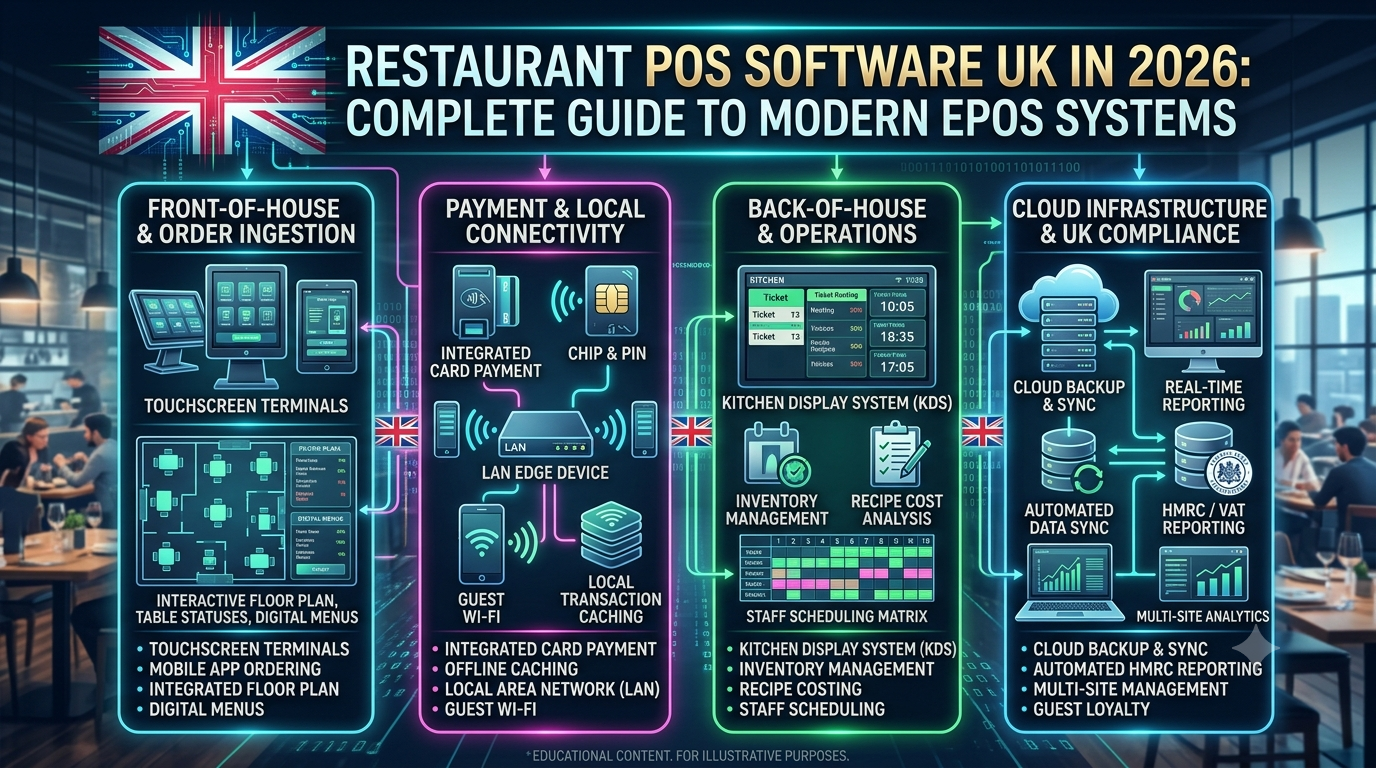
Running a restaurant in the UK involves much more than taking orders and printing receipts. Restaurant owners need to manage sales, menus, payments, inventory, kitchen operations, staff, customers, suppliers, and business reporting—often across multiple locations.
This is why modern **restaurant POS software UK** solutions are becoming an important part of restaurant technology.
A modern EPOS system can connect front-of-house operations with kitchen management, inventory, payments, reporting, and customer data in one platform.
For independent restaurants, cafés, pubs, QSRs, hotels, takeaways, and restaurant chains, choosing the right **restaurant EPOS system UK** can help create a more connected and efficient operation.
## What Is Restaurant POS Software?
Restaurant POS software is a digital system used to manage restaurant transactions and operational workflows.
POS stands for **Point of Sale**, while EPOS means **Electronic Point of Sale**.
A modern restaurant POS system can manage:
* Table orders
* Takeaway orders
* Online orders
* Billing
* Card payments
* Cash payments
* Kitchen orders
* Menu management
* Inventory
* Staff management
* Customer information
* Discounts
* Promotions
* Sales reports
Instead of using separate systems for each function, restaurants can connect multiple operations through one centralized platform.
## Why Restaurants Need Modern EPOS Software in 2026
Restaurant businesses operate in an environment where speed, accuracy, and visibility are increasingly important.
A modern POS system can help restaurants manage the entire order lifecycle:
**Customer Order → POS → Kitchen → Payment → Inventory → Reporting**
This provides restaurant owners with a clearer view of daily operations.
For multi-location businesses, centralized reporting can also make it easier to compare sales, menu performance, inventory, and operational information across locations.
## Key Features of Restaurant POS Software UK
### 1. Fast Restaurant Billing
The primary function of a restaurant POS system is fast and accurate billing.
Staff should be able to:
* Create orders quickly
* Modify items
* Apply discounts
* Split bills
* Merge tables
* Add service charges
* Process payments
* Print or send receipts
A fast checkout process can be particularly important during busy service periods.
## 2. Table Management
Dine-in restaurants need an easy way to manage tables.
A restaurant POS system can provide a visual table layout showing:
* Available tables
* Occupied tables
* Reserved tables
* Open orders
* Table duration
* Order status
Staff can select a table and immediately access the associated order.
## 3. Kitchen Order Management
A modern EPOS system can connect the front counter or waiting staff with the kitchen.
Instead of manually sending handwritten orders, orders can be routed to a kitchen display system or kitchen printer.
For example:
**Waiter → POS → Kitchen Display → Chef → Order Ready**
Kitchen staff can see the items that need to be prepared and update order status as required.
## 4. Kitchen Display System
A **Kitchen Display System (KDS)** can replace or complement traditional kitchen printers.
A KDS can organize orders according to:
* Order time
* Preparation status
* Order type
* Kitchen station
* Priority
This can help kitchens manage busy periods more effectively.
## 5. Inventory Management
Inventory is one of the most important areas for restaurants.
A restaurant POS system can help track:
* Ingredients
* Menu items
* Stock levels
* Suppliers
* Purchase orders
* Stock movements
* Wastage
Advanced systems can connect menu sales with inventory consumption.
For example, when a restaurant sells a particular menu item, the corresponding ingredients can be deducted from inventory according to the configured recipe.
## 6. Recipe Management
Recipe management can help restaurant owners understand the ingredients and quantities associated with each menu item.
This can support:
* Food cost calculation
* Ingredient tracking
* Menu profitability analysis
* Stock forecasting
* Portion control
Restaurant owners can use this information to better understand the relationship between menu pricing and ingredient costs.
## 7. Multi-Location Restaurant Management
Restaurant chains often need centralized management.
A multi-location POS system can allow businesses to manage multiple restaurants from a central platform.
Possible features include:
* Centralized menu management
* Location-specific pricing
* Central reporting
* Inventory visibility
* Employee management
* Sales comparison
* Branch performance reports
This can be especially useful for restaurant groups operating across different UK locations.
## 8. Payment Integration
Modern restaurant EPOS systems need to support different payment workflows.
Depending on the system and payment provider, restaurants may accept:
* Debit cards
* Credit cards
* Contactless payments
* Mobile wallets
* Cash
* Online payments
Integrated payment workflows can reduce manual entry and help keep transaction information synchronized with orders.
## 9. Takeaway and Delivery Management
Many restaurants operate both dine-in and takeaway businesses.
Restaurant POS software can manage:
* Takeaway orders
* Collection orders
* Delivery orders
* Customer details
* Order status
* Payment status
A centralized order system can reduce the need to manage separate manual processes.
## 10. Online Ordering Integration
Restaurants increasingly need digital ordering channels.
A POS system can potentially integrate with:
* Restaurant websites
* Mobile applications
* Online ordering platforms
* Delivery systems
The objective is to bring orders into the same operational workflow as in-store transactions.
## 11. Customer Management
A restaurant POS system can maintain customer information where appropriate.
Customer management features may include:
* Customer profiles
* Order history
* Contact information
* Preferences
* Loyalty information
This information can support customer engagement and personalized marketing.
## 12. Loyalty Programs
Restaurants can use POS software to implement loyalty programs.
Examples include:
* Points
* Rewards
* Discounts
* Membership benefits
* Promotional offers
Because transactions are recorded in the POS system, loyalty activity can be connected to customer purchases.
## 13. Restaurant Sales Reporting
Restaurant owners need visibility into business performance.
POS reporting can provide information about:
* Daily sales
* Weekly sales
* Monthly sales
* Best-selling products
* Sales by category
* Payment methods
* Discounts
* Staff performance
* Location performance
Reports can help management identify operational trends and make informed business decisions.
## 14. Staff Management
Restaurant POS software can also support staff workflows.
Possible features include:
* Staff accounts
* User permissions
* Role-based access
* Shift information
* Sales attribution
* Activity logs
Managers can restrict sensitive functions such as refunds, discounts, or configuration changes to authorized users.
# Restaurant POS Software for Different UK Businesses
A POS system does not need to be limited to traditional restaurants.
### Cafés
Cafés can use POS systems to manage:
* Counter orders
* Food and beverages
* Table orders
* Loyalty
* Inventory
* Payments
### Quick-Service Restaurants
QSRs need speed and operational efficiency.
POS systems can support:
* Fast ordering
* Kitchen routing
* Order status
* Combo meals
* Takeaway
* Self-service workflows
### Pubs
Pubs can use EPOS systems to manage food and beverage sales, tables, tabs, payments, and reporting.
### Hotels
Hotels may require POS systems that integrate restaurant operations with broader hospitality workflows.
### Cloud Kitchens
Cloud kitchens can benefit from centralized order, kitchen, inventory, and delivery management.
### Restaurant Chains
Chains often require centralized administration combined with location-level control.
# Cloud-Based vs Traditional Restaurant POS
Traditional POS systems often depend heavily on local hardware and software installations.
Cloud-based POS systems can store operational information in cloud infrastructure and allow authorized users to access management tools through connected devices.
| Feature | Traditional POS | Cloud-Based POS |
| ———————— | ————————- | —————— |
| Centralized management | Limited | Strong |
| Multi-location reporting | More complex | Easier |
| Remote management | Limited | Common |
| Software updates | Often manual | Typically easier |
| Data accessibility | Local-focused | Internet-based |
| Scalability | Depends on infrastructure | Generally flexible |
The appropriate architecture depends on the restaurant’s operational requirements, connectivity, security, and budget.
# Why Restaurant POS Integration Matters
A restaurant may use multiple technology systems:
**POS + Payment + Kitchen + Inventory + Online Ordering + Accounting + CRM**
If these systems operate independently, employees may need to enter the same information multiple times.
Integration can create a more connected workflow:
**Order → Payment → Kitchen → Inventory → Customer → Accounting**
This can reduce duplicate data entry and improve operational visibility.
# Restaurant POS and AI in 2026
Artificial intelligence is increasingly being incorporated into restaurant technology.
AI-powered POS solutions can potentially support:
* Sales forecasting
* Demand prediction
* Inventory forecasting
* Personalized recommendations
* Automated reporting
* Customer segmentation
* Menu analysis
* Operational insights
For example, historical sales information can be analyzed to identify demand patterns.
A restaurant could then use those insights to improve purchasing and staffing decisions.
AI should complement the restaurant’s operational processes rather than simply being added as a marketing feature.
# Restaurant POS Security
A POS system processes commercially sensitive information and may interact with payment infrastructure.
Important security considerations include:
* User authentication
* Role-based access
* Secure APIs
* Encryption
* Audit logs
* Secure payment integration
* Software updates
* Backup procedures
* Device security
Payment-related implementations should also account for applicable payment security requirements and the responsibilities of the payment service providers and software components involved.
# How to Choose Restaurant POS Software in the UK
Restaurant owners should evaluate a POS system based on actual business requirements.
Consider the following questions:
### Does it support your restaurant type?
A café may have different requirements from a large restaurant chain.
### Does it support your ordering model?
Check whether the system supports dine-in, takeaway, delivery, online ordering, or combinations of these.
### Can it manage inventory?
If food-cost control is important, inventory and recipe functionality may be essential.
### Can it integrate with payment systems?
Payment integration can simplify the checkout process.
### Can it support multiple locations?
Restaurant groups should check centralized management and branch-level controls.
### Does it provide useful reporting?
Reports should provide information that management can actually use.
### Can the system scale?
The POS should be capable of supporting additional locations, employees, products, and transaction volume as the business grows.
# How to Implement Restaurant POS Software
Implementing a new POS system requires more than installing hardware.
### Step 1: Analyze the Restaurant Workflow
Document how orders, payments, kitchen operations, inventory, and reporting currently work.
### Step 2: Define POS Requirements
Identify required features such as:
* Tables
* Menus
* Kitchen
* Inventory
* Payments
* Customers
* Loyalty
* Reporting
* Multi-location management
### Step 3: Configure the System
Set up:
* Menu items
* Categories
* Prices
* Tax settings
* Users
* Permissions
* Tables
* Printers or KDS
* Payment integrations
### Step 4: Connect Integrations
Integrate the required payment, delivery, accounting, inventory, and online ordering systems.
### Step 5: Train Staff
Employees should understand:
* Order entry
* Table management
* Payments
* Refunds
* Discounts
* Kitchen workflows
* End-of-day procedures
### Step 6: Test Before Launch
Test the entire workflow from customer order through payment and reporting.
### Step 7: Monitor Performance
After deployment, monitor system reliability, transaction workflows, user feedback, and reporting accuracy.
# How Much Does Restaurant POS Software Cost in the UK?
The cost of restaurant POS software varies depending on the solution and restaurant requirements.
Potential costs include:
* POS terminals
* Tablets
* Kitchen displays
* Printers
* Payment terminals
* Software subscriptions
* Custom development
* Integrations
* Installation
* Training
* Support
* Maintenance
A small café may require a relatively simple setup, while a restaurant chain may need a customized multi-location platform with inventory, kitchen management, online ordering, analytics, and centralized administration.
# Benefits of a Modern Restaurant EPOS System
A well-designed EPOS system can help restaurants:
* Speed up order processing
* Reduce manual billing errors
* Improve kitchen communication
* Monitor inventory
* Track sales
* Manage multiple locations
* Improve reporting
* Connect payment workflows
* Support online ordering
* Improve operational visibility
The exact benefits depend on how effectively the system is implemented and integrated into the restaurant’s workflow.
# Why Choose MusePOS?
Restaurants need technology that supports their real operational requirements.
**MusePOS** is designed around the needs of modern restaurant businesses, helping connect POS operations with ordering, billing, kitchen workflows, inventory, payments, and reporting.
Whether you operate a café, restaurant, pub, takeaway, hotel, cloud kitchen, QSR, or restaurant chain, a centralized POS platform can provide a foundation for managing daily operations.
For growing restaurant businesses in the UK, the right **restaurant POS software** can help create a more connected and scalable technology environment.
# The Future of Restaurant POS Software
Restaurant technology is moving toward connected platforms rather than isolated POS terminals.
The future of restaurant management is likely to combine:
**POS + Payments + Kitchen + Inventory + Online Ordering + Customer Data + Analytics + AI**
As restaurant businesses expand their digital operations, POS software can become the central technology layer connecting different parts of the business.
For restaurant owners, the objective should not simply be to replace a cash register. It should be to build a technology platform that supports faster operations, better visibility, and scalable growth.
# Frequently Asked Questions
### What is restaurant POS software?
Restaurant POS software is a digital system used to manage restaurant orders, billing, payments, tables, kitchen operations, inventory, customers, and business reporting.
### What is the difference between POS and EPOS?
POS means Point of Sale, while EPOS generally refers to Electronic Point of Sale. In the restaurant industry, the terms are often used to describe digital systems used for sales and operational management.
### Can restaurant POS software manage inventory?
Yes. Many modern restaurant POS systems include inventory management, ingredient tracking, recipe management, stock alerts, and purchasing functionality.
### Can an EPOS system manage multiple restaurants?
Yes. Multi-location EPOS platforms can provide centralized administration and reporting while allowing individual locations to manage their own operations.
### Can restaurant POS software integrate with online ordering?
Yes. Depending on the platform, POS software can integrate with restaurant websites, online ordering systems, delivery platforms, and other digital channels.
### Is cloud-based POS better for restaurants?
Cloud-based POS can provide benefits such as centralized management, remote access, easier updates, and multi-location reporting. However, the right architecture depends on the restaurant’s requirements and connectivity.
### Can restaurant POS software use AI?
Yes. AI can be incorporated into restaurant software for forecasting, recommendations, reporting, demand analysis, customer insights, and automation.
### How much does restaurant POS software cost in the UK?
Pricing depends on hardware, software, number of locations, integrations, features, subscriptions, and customization requirements.
—
## SEO Information
**Primary Keyword:** Restaurant POS software UK
**Secondary Keywords:**
* restaurant POS software
* restaurant EPOS system UK
* restaurant EPOS software
* EPOS system UK
* restaurant POS system
* restaurant billing software UK
* restaurant management software UK
* POS software for restaurants
* cloud POS system UK
* restaurant inventory management software
* multi-location restaurant POS
* restaurant ordering system UK
* restaurant POS system for small business
* hospitality POS software UK
**SEO Title:**
Restaurant POS Software UK in 2026 | Modern EPOS Guide
**Meta Description:**
Discover how restaurant POS software in the UK can manage billing, tables, kitchen orders, inventory, payments, online ordering, reporting, and multi-location operations.
**Suggested URL Slug:**
`/restaurant-pos-software-uk/`
Leave a Reply